


The best IBS tracking app depends on what you need to record, whether that means food, symptoms, bowel movements, or gut-directed support. Cara Care, Bowelle, mySymptoms Food Diary, Monash University Low FODMAP Diet, and Nerva serve different purposes, so the most useful choice is the one you can use consistently.
A quick symptom log may fit a busy day, while detailed entries can compare meals, stool form, pain, bloating, stress, sleep, and medications over time. The Bristol Stool Scale, PDF and CSV exports, reminders, platform access, subscription limits, and privacy controls all affect how useful an app will be during daily life or a healthcare visit.
App records can help you discuss possible patterns with a qualified professional, but they cannot diagnose IBS, prove a food caused symptoms, or replace individualized care. Persistent, severe, or worsening symptoms still need medical evaluation, especially when warning signs such as bleeding, fever, vomiting, or unexplained weight loss appear.
IBS Tracking Apps Key Takeaways
- Cara Care suits broad tracking of food, symptoms, mood, stress, and bowel movements.
- Bowelle prioritizes quick entries for meals, stool details, urgency, and symptoms.
- mySymptoms Food Diary provides detailed analysis, Bristol Stool Scale entries, and PDF or CSV exports.
- Monash University Low FODMAP Diet focuses on FODMAP education and portion guidance.
- Nerva offers gut-directed hypnotherapy rather than comprehensive food and symptom tracking.
- Check app cost, platform access, reminders, privacy controls, and report-sharing options before choosing.
- App patterns support clinician conversations but cannot diagnose IBS or confirm individual triggers.
Which IBS Tracking Apps Rank Highest For Your Needs?
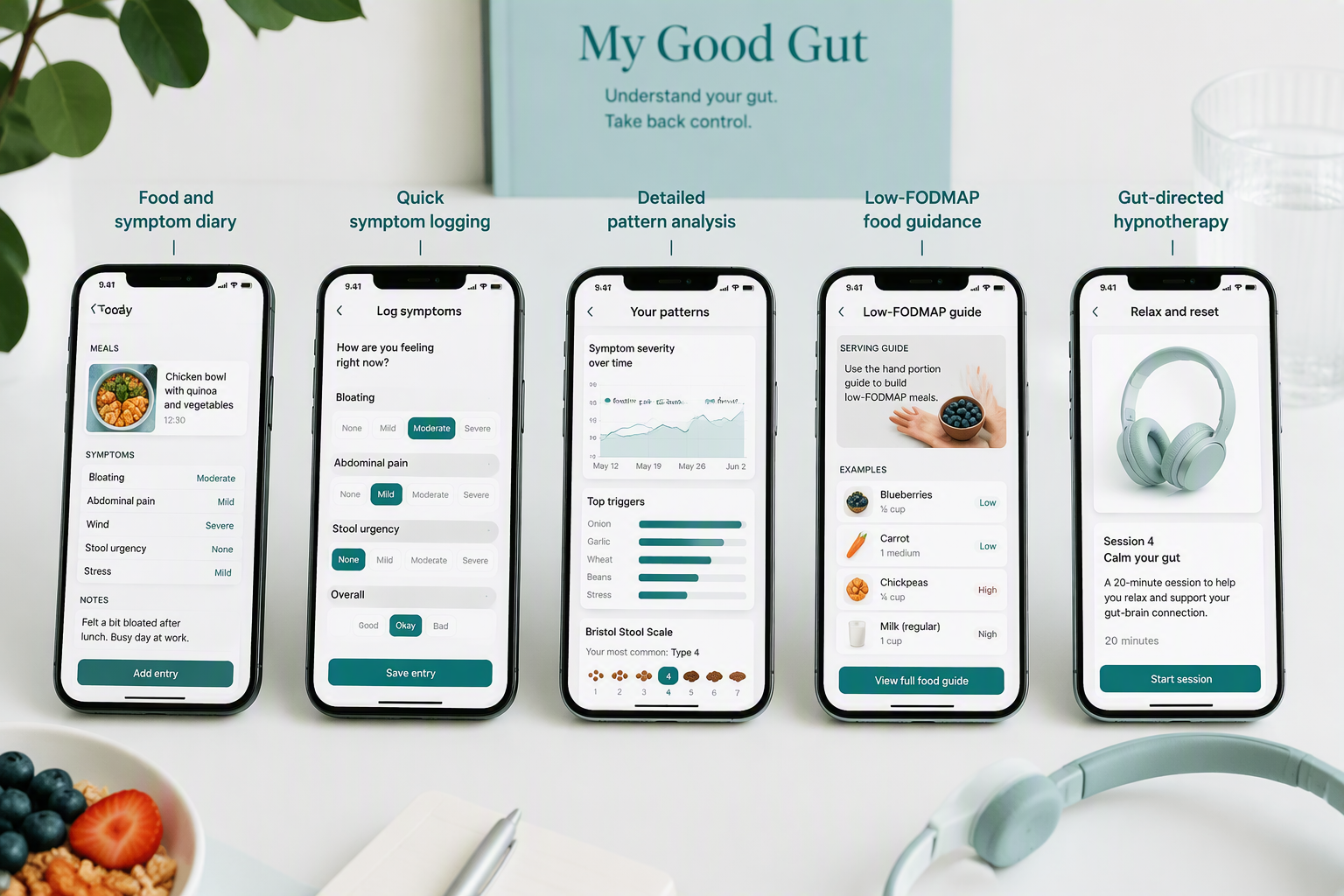
These five IBS tracking apps are ranked by use case, not treated as interchangeable or assigned one universal “best” label. This guide helps adults with recurring irritable bowel syndrome (IBS) symptoms, including busy parents and professionals, compare practical options. Tracking supports medical evaluation and individualized care, but it doesn’t replace either one.
A quick-entry tool may suit a busy workday or family routine. A detailed diary can show possible relationships among meals, pain, bloating, gas, constipation, and diarrhea over time. Compare the main differences here:
App | Primary purpose | Useful features |
|---|---|---|
Cara Care | Food and symptom diary | Structured logs, reminders, reports, and pattern visibility |
Bowelle | Food and symptom diary | Fast entries, stool details, and trigger notes |
mySymptoms Food Diary | Detailed food diary | Meals, bowel movements, symptoms, and pattern review |
Monash University Low FODMAP Diet | FODMAP diet apps | Guidance on fermentable oligosaccharides, disaccharides, monosaccharides, and polyols |
Nerva | Gut hypnotherapy apps | Gut-directed hypnotherapy and symptom support |
The categories overlap, but their primary roles differ. Cara Care, Bowelle, and mySymptoms Food Diary differ mainly in entry speed, detail, and reporting depth. Monash University Low FODMAP Diet is a food-guidance tool, while Nerva centers on gut-directed hypnotherapy. Healthify separates diet, tracking, and hypnotherapy categories, which can make the choice clearer. These distinctions also explain why irritable bowel syndrome apps, FODMAP diet apps, and gut hypnotherapy apps serve different needs.
Before choosing, check:
- iPhone or Android availability
- Free access versus paid essential features
- Reminder flexibility and privacy disclosures
- Exportable records or clinician reports
The app you can use consistently is often more useful than the one with the longest feature list. Compare options while IBS in everyday life or managing IBS during the workday, and discuss unclear patterns with a qualified healthcare professional.
1. Cara Care: Best For Food, Mood, And Bowel Logs
Cara Care is a broad diary for people with IBS who want to track more than meals and symptoms. As an IBS food diary app, it includes:
- Food, bowel movements, digestion symptoms, pain, mood, and stress
- Menstrual cycle, medications, notes, meal photos, and skin condition
- Exercise, sleep, and water intake
This range can help you compare digestive symptoms with everyday routines. However, recording everything may become tiring. Starting with meals, bowel movements, pain, and one or two suspected triggers can make IBS symptom logging easier to maintain. Add mood or stress tracking when those factors seem relevant instead of turning each day into a large data-entry task.
Cara Care works on both iPhone and Android, which helps households or care teams using different mobile platforms. Its recurring reports are another practical advantage. Daily, weekly, and monthly summaries can cover bowel movements, pain, mood, stress, menstruation, exercise, sleep, and water intake.
These reports may help you prepare focused questions for a healthcare professional, but they cannot diagnose IBS or prove that one factor caused a flare. A report showing that symptoms occurred after a food, for example, does not establish a food intolerance.
Ratings for Cara Care vary by source, so treat them as weak evidence either way. It is well rated by users in the app stores, while the Healthify directory gives it 2 out of 5 (source), a reminder that a directory score reflects a reviewer’s criteria, not proof that an app improves symptoms.
Choose Cara Care when broad tracking, IBS mood tracking, and recurring summaries matter most. A simpler app may suit you better if rapid symptom logging is the priority. Use the reports as conversation notes, not as a diagnosis or a reason to restrict foods without professional guidance.
2. Bowelle: Best For Quick Symptom Logging
After Cara Care’s broad logs, Bowelle is a practical IBS symptom tracker when fast daily logging matters more than a detailed food diary. It records:
- Meals: Food descriptions, photos, and custom fields add useful detail.
- Bowel movements: Frequency, consistency, amount, and urgency support IBS bowel movement tracker needs and diarrhoea and constipation tracking.
- Symptoms: Discomfort, mucus, and blood capture details that can be difficult to recall later.
Visual summaries may make recurring patterns easier to spot than isolated notes. However, a pattern suggests a possible association only. It cannot prove that a food caused an IBS flare or establish a diagnosis, so use Bowelle as a food and symptom tracker, not a substitute for medical care.
Apple Health integration adds context through step count, weight, and sleep data. Comparing these measures with symptoms may show how daily routines relate to digestive changes, but they do not provide medical evidence. Blood in stool and persistent, severe, or worsening symptoms need evaluation by a qualified healthcare professional. Tracking may also help you prepare for conversations about urgency-related anxiety.
Bowelle’s six-day workflow keeps IBS trigger tracking manageable: log consistently for six days, review the visual report, and discuss possible triggers with a healthcare professional. Compared with a more detailed option such as mySymptoms Food Diary, Bowelle suits people whose main barrier is time or effort. It sits in the middle of the Healthify directory’s five-star scale at 4 out of 5 (source), and its app-store review base is small, so the “quick, easy IBS diary” description speaks more to usability than to strong evidence. Treat the results as conversation starters, not conclusions.
3. mySymptoms Food Diary: Best For Detailed Pattern Analysis
For deeper pattern analysis than Bowelle’s quick logging, mySymptoms Food Diary is the strongest fit when quick symptom check-ins aren’t enough. You can record symptom intensity and timing, then compare what you ate, how severe symptoms felt, and when they appeared. That detail can strengthen food and symptom tracking for a healthcare visit, but a suspected correlation does not prove causation.
Bowel-movement entries use the Bristol Stool Scale, giving you a consistent way to describe stool form instead of relying on memory or vague terms such as “hard” or “loose.” The diary remains a tracking aid, not a diagnostic tool, and differs from the Monash University Low FODMAP diet app, which is designed for structured FODMAP diet management.
Alongside meals and symptoms, mySymptoms can capture:
- Daily context: Energy, sleep, medications, and activities may help you notice associations involving routine, stress, rest, or treatment.
- Possible triggers: Repeated entries are more informative than reacting to one difficult day, though they should not prompt you to stop prescribed medication or make major dietary changes without individualized guidance.
The Healthify directory rates the Lite version 4 out of 5 (source). This was the only paid app in the comparison, so its deeper analysis has to be weighed against cost and the time detailed logging takes. FODMAP diet apps, including a low FODMAP app or FODMAP food tracker, may suit you better if you want simpler, food-focused guidance.
PDF and CSV exports help you bring a structured record to an appointment or keep it for further review, including a clear date range and relevant medication or activity context. Those exports can make conversations more focused, especially when symptoms persist or worsen. Discuss dietary changes with a healthcare professional who can account for your symptoms and nutritional needs.
4. Monash University Low FODMAP Diet: Best For Food Guidance
In contrast to mySymptoms Food Diary’s detailed pattern analysis, Monash University Low FODMAP Diet is the strongest choice here for learning which ingredients and serving sizes are low, moderate, or high in fermentable oligosaccharides, disaccharides, monosaccharides, and polyols (FODMAPs). Its FODMAP portion guidance goes further than most printed food lists. Its university-based database can simplify grocery shopping, meal planning, family meals, and IBS at restaurants.
The app is mainly a food-education tool, not a complete IBS symptom diary. It won’t replace records of meals, bowel movements, bloating, pain, stress, and timing when you’re looking for personal patterns.
The practical choice depends on what you need most:
- Choose Monash: Ingredient education and portion guidance are your priority.
- Choose a tracking app: Reminders, symptom timelines, and reports matter more than food information.
- Use both carefully: Food records and symptom notes can support a more focused conversation with a clinician or registered dietitian.
Healthify places Monash among FODMAP-focused apps and gives it a five-star rating, while symptom-and-food-diary apps serve a different purpose. Gut-directed hypnotherapy and gut hypnotherapy apps, including Nerva, address another part of IBS self-management and aren’t food-analysis tools.
A low-FODMAP approach can become restrictive, particularly when foods aren’t reintroduced with guidance. Persistent, severe, or worsening symptoms, nutrition concerns, or difficulty expanding your diet warrant advice from a qualified healthcare professional. Monash can improve food knowledge and support portion decisions during a clinician-supervised dietary plan. Use the app’s guidance alongside advice tailored to your nutritional needs.
5. Nerva: Best For Gut-Directed Hypnotherapy
For support beyond Monash University Low FODMAP Diet’s food guidance, Nerva is a gut-directed hypnotherapy app for adults seeking relaxation and brain-gut support alongside IBS tracking. Gut-directed hypnotherapy for IBS has its own evidence base, separate from any single app. It’s available without a prescription, which may suit busy parents and professionals who prefer a structured, self-guided routine. A four-star rating in one app directory offers a comparison signal, but it reflects user experience, not proof that Nerva reduces symptoms for everyone.
Gut-directed hypnotherapy may help some people manage IBS symptoms, but evidence for any specific app, including Nerva, remains limited. Consistent practice may be needed before you can judge whether Nerva fits your symptoms, schedule, and budget. Like other apps for managing IBS, Nerva should support symptom care rather than promise relief.
Pairing Nerva with simple records gives you more useful context. An IBS food diary app or IBS bowel movement tracker can capture meals, stool changes, pain, bloating, stress, and session timing. Brief, consistent entries can help you discuss patterns with a clinician, while also making Nerva one option among IBS management apps and irritable bowel syndrome apps, not a replacement for identifying possible triggers.
Medical evaluation remains essential. Nerva cannot diagnose IBS or rule out other causes of digestive symptoms. Seek qualified medical advice for persistent, severe, or worsening symptoms, or before assuming new symptoms are related to IBS. Use this information to prepare for a discussion with a qualified healthcare professional. Good health app safety includes sharing useful records with a healthcare professional and keeping individualized care in place. Relaxation sessions should complement, not delay, appropriate evaluation.
How Do You Choose The Right IBS Tracking App?
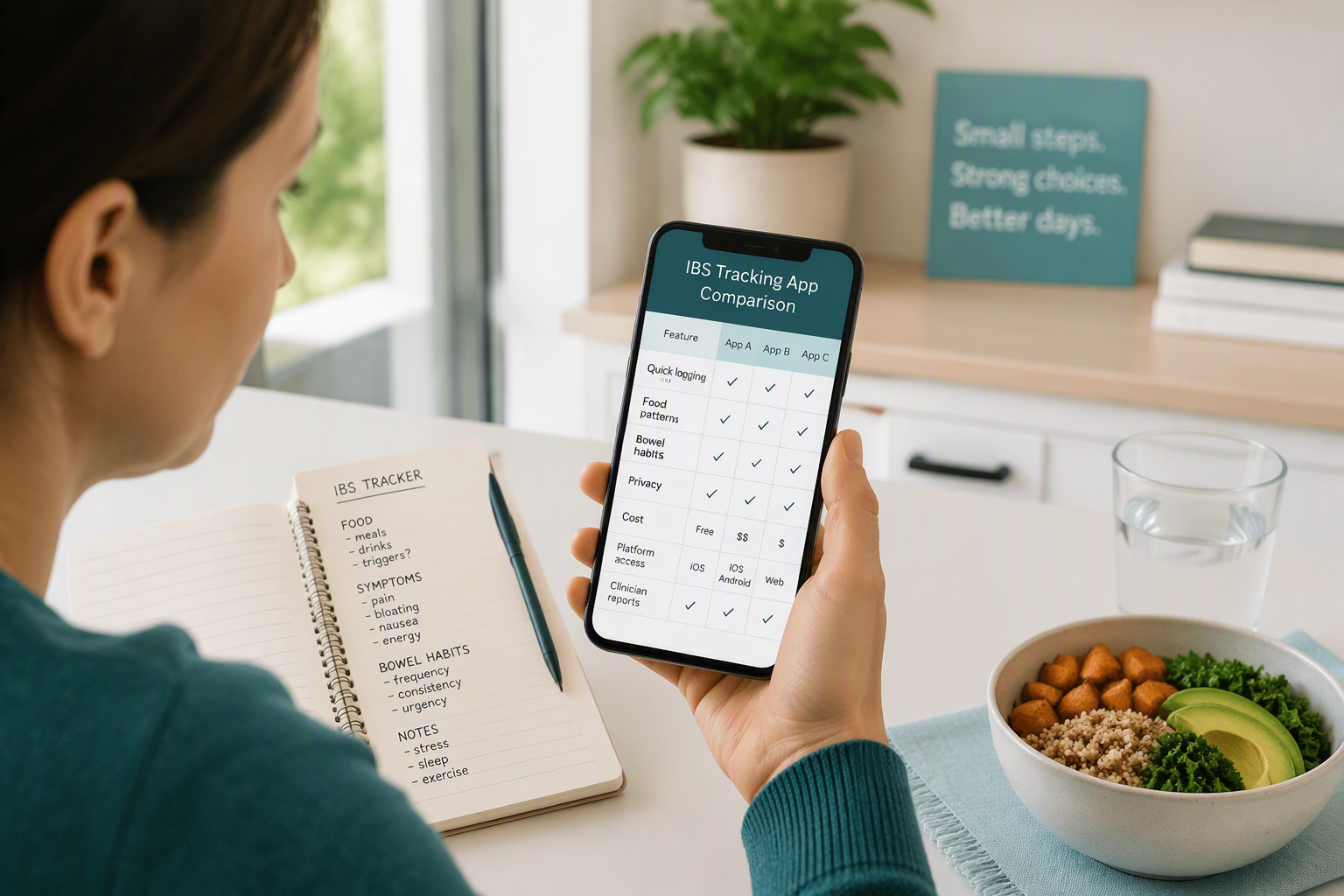
Choose an IBS app by the job you need it to do, the care plan you’re following, and the routine you can maintain. No single tracker fits every symptom pattern.
Match the app to your main need:
- Quick logging: IBS symptom logging records pain, gas, stress, or bowel movements during a busy workday.
- Food patterns: Food and symptom tracking compares meals with bloating, pain, gas, diarrhoea, or constipation. A useful bloating tracker should make these patterns easy to review.
- Bowel habits: Diarrhoea and constipation tracking captures stool frequency, consistency, urgency, and timing, which may give a clinician more context than one symptom score.
- Guided care: A low-FODMAP app may fit a plan supported by a registered dietitian or another qualified professional. Gut-directed hypnotherapy may suit people focusing on the brain-gut connection as well as food.
Healthify’s listings show the range of options, not a universal ranking of effectiveness. Monash University Low FODMAP Diet and FODMAP Made Easy receive five-star user ratings, while mySymptoms Food Diary Lite and Bowelle receive four stars. These comparisons reflect user ratings, not proof that one app works better for every person.
Before choosing, check the practical details that determine whether IBS trigger tracking will fit your life:
- Access: Confirm Android or iPhone compatibility, readable screens, and reminders that suit family or work demands.
- Privacy and cost: Read the privacy policy, review data controls, and confirm whether free access covers your needs before a subscription begins.
- Reports: For clinician visits, look for doctor-ready reports or exports covering dates, meals, symptoms, bowel movements, stress, and possible triggers.
Use app data to prepare focused questions about individual triggers and care options. Individual triggers vary, and digestive symptoms can have many causes. For persistent, severe, or worsening symptoms, bring the record to a qualified healthcare professional to guide next steps.
How Can You Turn App Data Into Useful Insights?
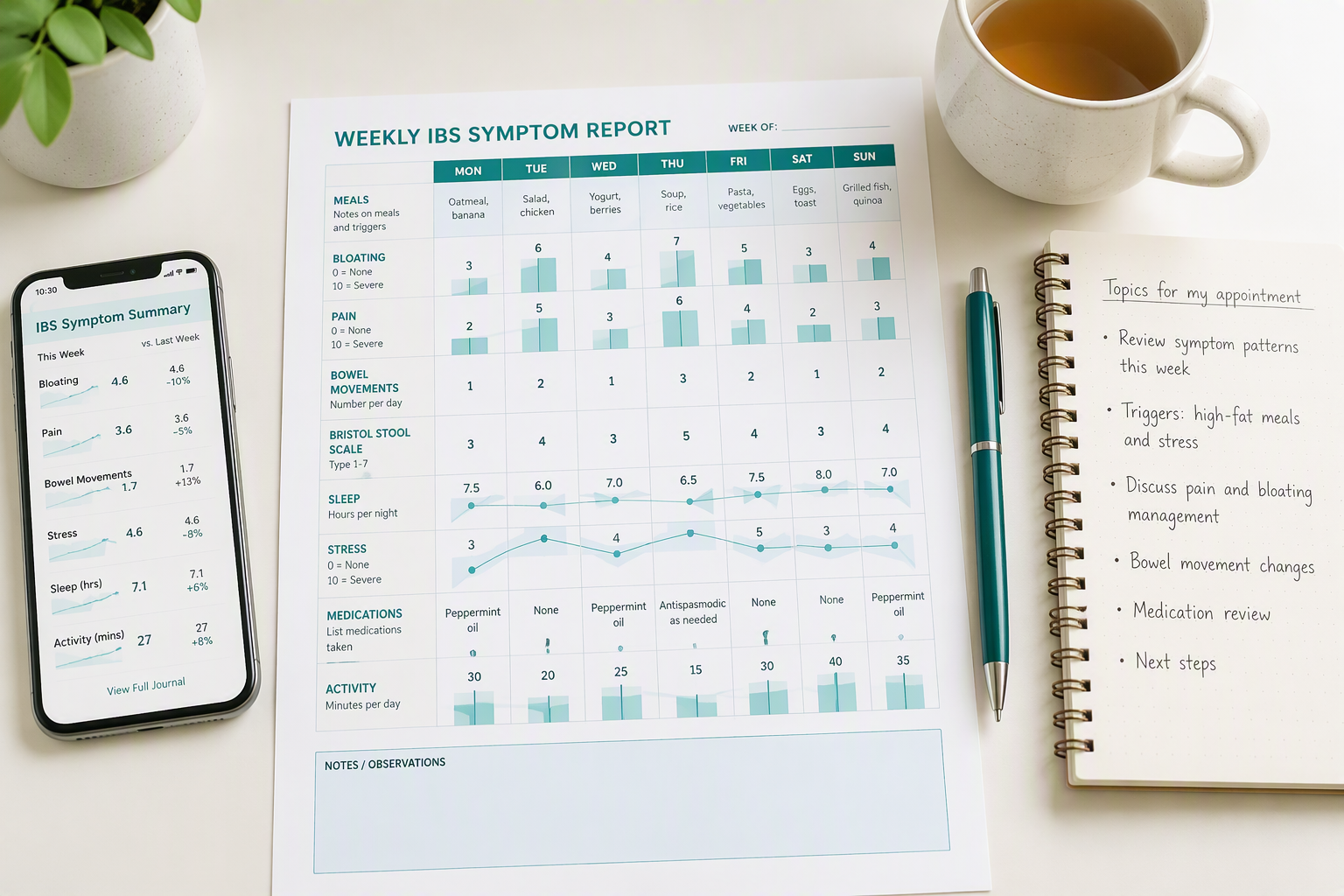
Useful app insights come from consistent entries and daily context, not perfect records or one difficult symptom day. A low-effort routine that fits work, school, and family schedules is more useful than detailed tracking you cannot maintain.
- Log core details soon after they occur: Record meals and drinks, then bowel-movement timing, stool appearance using the Bristol Stool Scale, urgency, straining, pain, bloating, and other symptoms. Use the same rating scale each time, with reminders you can follow on busy days.
- Add context beyond food: Stress, sleep quality, fatigue, medications, supplements, exercise, and other activities can shape symptoms. IBS medication tracking may help you compare symptom changes with a prescription or supplement. Free-form notes can capture travel, skipped meals, or a demanding day. Apps such as mySymptoms and the Canadian Digestive Health Foundation’s myIBS include several of these fields. Bowelle IBS tracker may suit a simpler, symptom-focused routine.
- Give reports enough information to work with: CDHF’s myIBS reports appear after at least five days of tracking. Wait until you have enough consistent data before relying on any report, since a longer record can show whether a suspected relationship repeats across different days. Compare symptom intensity, stool patterns, sleep, stress, and treatment together rather than blaming the most recent meal.
- Turn repeated patterns into questions: “Bloating appeared after similar meal combinations” is a useful observation. “This food caused my IBS” is an assumed diagnosis. A qualified healthcare professional can help decide whether a structured dietary change or further evaluation makes sense.
Before an appointment, export or print available reports with dates, foods, symptoms, medications, stressors, activities, uncertain entries, and gaps in the record. Bring the record to an appointment so a clinician can assess repeated patterns alongside your history. Review health app privacy settings before entering sensitive information, particularly when data syncs with an account or third parties.
Activity can add useful context, so record movement alongside symptoms and review movement and IBS symptoms. A consistent record gives your clinician clearer, more cautious evidence to discuss.
What Should You Check About Privacy And Accessibility?
Privacy and accessibility matter as much as symptom features when you compare an IBS app. Before downloading, confirm platform compatibility and whether the free tier includes food, digestive symptoms, bowel movements, and IBS medication tracking. App-directory listings show Cara Care on iPhone and Android, and they describe it as supporting IBS-related tracking, with paid-versus-free feature limits that should be checked before download (source).
Review the privacy policy in practical terms. Check permissions for health data, location, contacts, calendars, and notifications, then confirm that core tracking works without unrelated access. A health app safety check should also cover account deletion, data-sharing controls, and options for sending reports to a clinician or another person.
Record portability matters if you switch apps or need a complete medical record. mySymptoms supports portable document format (PDF) and comma-separated values (CSV) diary exports, while other tools may not. Confirm that exports contain dates, meals, notes, symptoms, and bowel movements, and check whether shared reports can later be withdrawn or access restricted.
Test the app during a busy routine, not only during setup. Look for:
- Readable design: Clear text, strong color contrast, simple navigation, and adjustable font support.
- Practical reminders: Alerts you can manage without creating notification fatigue.
- Reliable access: Offline logging, clear sync timing, and features that remain available without internet access.
Choose the app that supports consistent records without adding privacy, cost, or access barriers, since a useful IBS symptom tracker should make consistent records easier.
How Can You Track IBS Symptoms Safely?
Apps for managing IBS can organize daily details and support a more productive clinician visit by preserving timing and symptom context. Log meals, bowel movements, stool form, pain, bloating, stress, sleep, and suspected triggers. Compare each app’s health app privacy practices, data controls, and report features before choosing one.
Symptom scores and questionnaires also have limits. Rome IV-based questions may point to possible IBS-C, IBS-D, IBS-M, or IBS-U, but an app cannot confirm a subtype, rule out conditions such as inflammatory bowel disease, or determine which tests you need. Treat the results as a record rather than a medical conclusion.
Patterns in your log can support a conversation with a qualified healthcare professional about individualized options, such as stress management, sleep, exercise, cognitive behavioral therapy, gut-directed hypnotherapy, or a structured low fermentable oligosaccharides, disaccharides, monosaccharides, and polyols (low-FODMAP) approach. Don’t remove several food groups, stop prescribed medicine, or change treatment based only on an app. Discuss any dietary change with a professional who can account for your symptoms and nutritional needs. A log may also help with travel planning alongside an what to pack for IBS flares or discussions about pregnancy and IBS symptoms.
Seek medical care for:
- Persistent symptoms: Symptoms that are severe, worsening, or ongoing.
- Bleeding or vomiting: Rectal bleeding, black stools, fever, or repeated vomiting.
- Other warning signs: Unexplained weight loss, anemia, nighttime symptoms, or a new bowel-habit change.
Tracking should support evaluation, not delay it. This content is for educational purposes only and is not a substitute for personalized medical advice. Bring the symptom record to a qualified healthcare professional when you need help interpreting patterns.
IBS Tracking Apps FAQs
These IBS Tracking Apps FAQs cover common questions about comparing tools, logging food and symptoms, spotting patterns, protecting privacy, and setting realistic expectations. They’ll help you assess which features fit your routine before choosing an app.
1. Can IBS Tracking Apps Export Reports To Doctors?
Many IBS tracking apps turn meals, bowel movements, symptoms, and well-being notes into an in-app summary, printable journal, or downloadable report. CDHF’s myIBS app, for example, creates printable doctor information after at least five days of tracking, while mySymptoms offers monthly reports or printable journals.
A PDF helps during appointments, and a CSV allows more detailed review, but neither automatically transfers data to a doctor’s electronic health record. Check the app’s current listing and settings for PDF, CSV, printing, secure sharing, and in-app summary features before choosing it.
2. Do IBS Tracking Apps Support Symptom Reminders?
Yes. Symptom reminders can prompt you to log meals, bowel movements, pain, bloating, stress, and possible triggers before a busy workday or family routine makes you forget. Some apps also remind you about medications, supplements, appointments, or counseling, keeping health routines together without replacing medical advice. Whether you need IBS mood tracking or a bloating tracker, check for customizable schedules, repeat times, reminder types, snooze options, and overnight notification controls. Confirm which features are free, since medication and advanced reminders may require a subscription.
3. Can IBS Tracking Apps Track Menstrual Cycle Symptoms?
Some IBS tracking apps let you log period dates, pain, bloating, bowel movements, food, stress, and sleep on one timeline. Cara, for example, includes menstrual details in daily, weekly, and monthly reports, which can help you compare recurring symptoms with cycle timing.
Symptoms that occur before or during menstruation may show a pattern to discuss with a clinician. However, tracking reveals timing and association, not proof that hormonal changes caused IBS symptoms. Persistent, severe, or worsening symptoms need qualified medical evaluation rather than app data alone.
4. Do IBS Tracking Apps Work Offline?
IBS tracking apps vary in their offline support. Some let you record meals, symptoms, bowel movements, or mood without internet access, while others require a connection or account sign-in. Before IBS and air travel, check current app documentation for offline entry, automatic syncing after reconnection, missing or duplicate records, and offline reports. Confirm cloud-saving, export, and subscription requirements, then test the app in airplane mode before relying on it during travel.